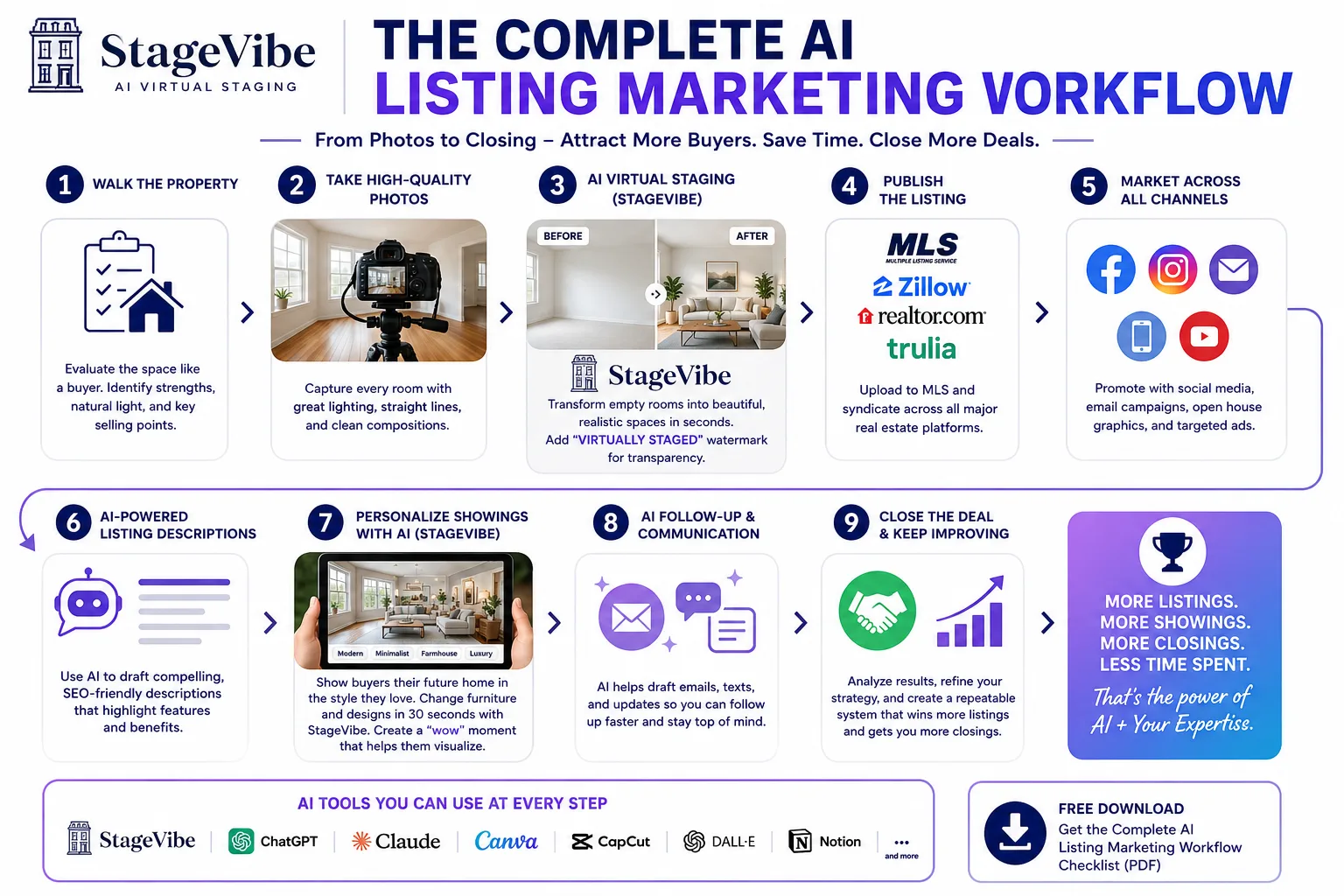

Everyone is talking about AI. Very few agents are talking about the entire workflow.
That's where I think AI actually shines.
I don't use AI to replace my job. I use it to remove the repetitive work so I can spend more time talking to clients and getting properties in front of the right buyers.
Over the past year, I've refined a simple AI listing marketing workflow that takes a listing from empty rooms to a signed contract much faster than my old process.
It isn't complicated. Here's exactly how I do it.
Free Printable PDF
Get the Complete AI Listing Marketing Checklist
Follow along with a free, printable 9-step checklist covering this entire workflow — from photos to closing. Print it or save it as a PDF for every listing.
Step 1. Walk the Property

Before I take a single photo, I walk through the home like a buyer.
What would catch my attention? Which room has the best natural light? Which space needs the most help?
Vacant homes are usually the hardest to market because buyers have trouble imagining how they'll actually live there. That's where I start making notes.
Step 2. Take High-Quality Listing Photos

You don't need a $10,000 camera. Good lighting, straight vertical lines, and clean compositions matter much more.
I photograph every room as if I'm creating the final MLS gallery. Even though I know AI will help later, the original photos still need to be good.
Garbage in. Garbage out.
Want the details? See my 12 tips for listing photos that sell →
Step 3. Use AI Virtual Staging

This is where my workflow changes.
Instead of uploading empty rooms to the MLS, I use StageVibe to virtually furnish each space.
The goal isn't to make the room look extravagant. It's to answer the question every buyer is asking.
"How would I actually live here?"
Every staged image includes a "Virtually Staged" watermark so buyers know exactly what they're looking at.
Transparency matters. You're helping buyers visualize possibilities, not creating something that doesn't exist. Here's how the built-in watermark keeps you MLS-compliant →
Step 4. Publish the Listing

Once the staged images are ready, I upload both the original photos and the virtually staged versions where appropriate.
Now the listing tells a story instead of showing a series of empty rooms. Buyers stop scrolling because they can picture themselves living there.
That's the first win.
Step 5. Share Everywhere

Once the MLS is live, the marketing starts. I create:
- Zillow-ready images
- Social media posts
- Instagram Stories
- Facebook posts
- Email announcements
- Open house graphics
The listing stays consistent across every platform.
Step 6. Use AI for Listing Descriptions

I still write every listing description. AI just gives me a head start.
Instead of staring at a blank screen, I generate a first draft and edit it until it sounds like me. That usually cuts my writing time in half.
Step 7. Prepare for Showings (Live AI Staging)

This has become my favorite part of the workflow.
When buyers visit a vacant home, I don't just show them the virtually staged MLS photos. I open StageVibe on my phone or tablet.
Then I ask a simple question.
"What style do you like?"
Modern Farmhouse? Scandinavian? Coastal? Luxury?
Within about 30 seconds, I can generate a new design that matches their taste. The reaction is almost always the same.
Their eyes get bigger. They smile. Then they start talking about where their couch would go. Or where the kids would play. Or how they'd decorate for the holidays.
That conversation rarely happens in an empty room.
A Real Example From Jersey City
Recently, I listed three vacant rental units in Jersey City. Every apartment was empty. I followed the exact workflow above.
First, I photographed each unit. Next, I used StageVibe to create realistic virtual staging for the MLS. Every image clearly displayed the "Virtually Staged" watermark.
During each showing, I used StageVibe again to generate different furniture styles based on what the prospective tenant liked. Instead of asking them to imagine the possibilities, I showed them.
The result surprised even me. All three rentals were leased after the very first showing.
Was virtual staging the only reason? Of course not. Pricing, location, and presentation all mattered. But helping people visualize themselves living there made the homes far more memorable than empty apartments.
Case Study
3 Rentals, 3 First-Showing Contracts
See the full breakdown of how AI virtual staging helped lease three Jersey City rentals after a single showing each.
Step 8. Follow Up With AI

After every showing, I use AI to speed up my communication. It helps me draft:
- Follow-up emails
- Text messages
- Seller updates
- Showing summaries
I still personalize everything before sending it. AI handles the first draft. I handle the relationship.
Step 9. Keep Improving

Every listing teaches me something.
Which photos got the most clicks? Which staging style generated the best response? Which social media posts brought inquiries?
Small improvements add up over dozens of listings.
My Complete AI Listing Marketing Workflow
Here's the process in one place.
Walk the property
Take professional-quality photos
Virtually stage vacant rooms
Publish the MLS listing
Promote across every marketing channel
Use AI to draft listing descriptions
Personalize showings with live AI staging
Automate follow-up drafts
Review results and improve the process
Simple. Repeatable. Fast.
AI Doesn't Replace Great Agents
Some people worry AI will replace real estate agents. I don't see it that way.
AI can't build trust. It can't negotiate. It can't understand what a family is really looking for.
But it can remove hours of repetitive work every week. That gives us more time to do the parts of the job that actually matter.
For me, that's what AI is supposed to do. Help people. Not replace them.
Final Thoughts
My Jersey City rentals reinforced something I've believed for a long time.
People don't buy empty rooms. They buy a vision of their future.
The faster you help them see that vision, the easier it becomes for them to make a decision.
That's why AI has become part of every listing I market. Not because it's trendy. Because it helps buyers and tenants imagine home.
Want proof it works? Browse more agent case studies and StageVibe testimonials from Realtors across the country.
Free Printable PDF
The Complete AI Listing Marketing Checklist
Every step from this article in one printable 9-step checklist — photos, AI virtual staging, MLS, marketing, showings, follow-up, and closing. Print it or save it as a PDF.
Download the Free Checklist →Frequently Asked Questions
What is an AI listing marketing workflow for real estate agents?
An AI listing marketing workflow is a repeatable process that uses AI to remove repetitive work across a listing — from photography and AI virtual staging to MLS publishing, multi-channel promotion, listing descriptions, live in-showing staging, and follow-up. The goal is to move a listing from empty rooms to a signed contract faster while the agent focuses on clients and negotiation.
How do you use AI virtual staging during in-person showings?
During a showing of a vacant home, open StageVibe on a phone or tablet, ask the buyer what style they like (Modern Farmhouse, Scandinavian, Coastal, or Luxury), and generate a staged version of the room in about 30 seconds. This helps buyers picture themselves living there instead of imagining possibilities in an empty room.
Does AI virtual staging need to be disclosed on the MLS?
Yes. Virtually staged images should be clearly disclosed. StageVibe adds a "Virtually Staged" watermark burned into every image so buyers know exactly what they're looking at, which supports MLS and NAR disclosure requirements. Read the MLS compliance guide →
Will AI replace real estate agents?
No. AI can't build trust, negotiate, or understand what a family is really looking for. It removes hours of repetitive work each week — drafting descriptions, follow-ups, and staging visuals — so agents have more time for the relationship-driven parts of the job.
Turn empty rooms into a vision buyers can picture — stage vacant spaces in under 60 seconds
Try StageVibe Virtual Staging Free