Flyer Studio: Free Open House Flyer Maker with QR Code — No Design Skills Needed
Place a scannable QR code on any listing flyer, sign-in sheet, or social media image — and download a print-ready file in seconds. Flyer Studio runs entirely in your browser. No software to install, no design experience required.

Jane Luo
Founder & CEO · Licensed NJ/NY Realtor
May 5, 2026
The Problem: Getting a QR Code onto Your Flyer Shouldn't Require Photoshop
You have a listing flyer. You have a QR code. You want to put the QR code on the flyer so prospects can scan it at your open house. Simple enough — except it usually means opening Canva, Photoshop, or PowerPoint, importing both files, manually positioning and resizing, exporting at the right resolution, and hoping the QR code still scans after compression.
That's too many steps for something this straightforward. So we built Flyer Studio — a free, browser-based canvas editor that does one thing well: puts your QR code on your flyer and gives you a print-ready file.
What Flyer Studio Does
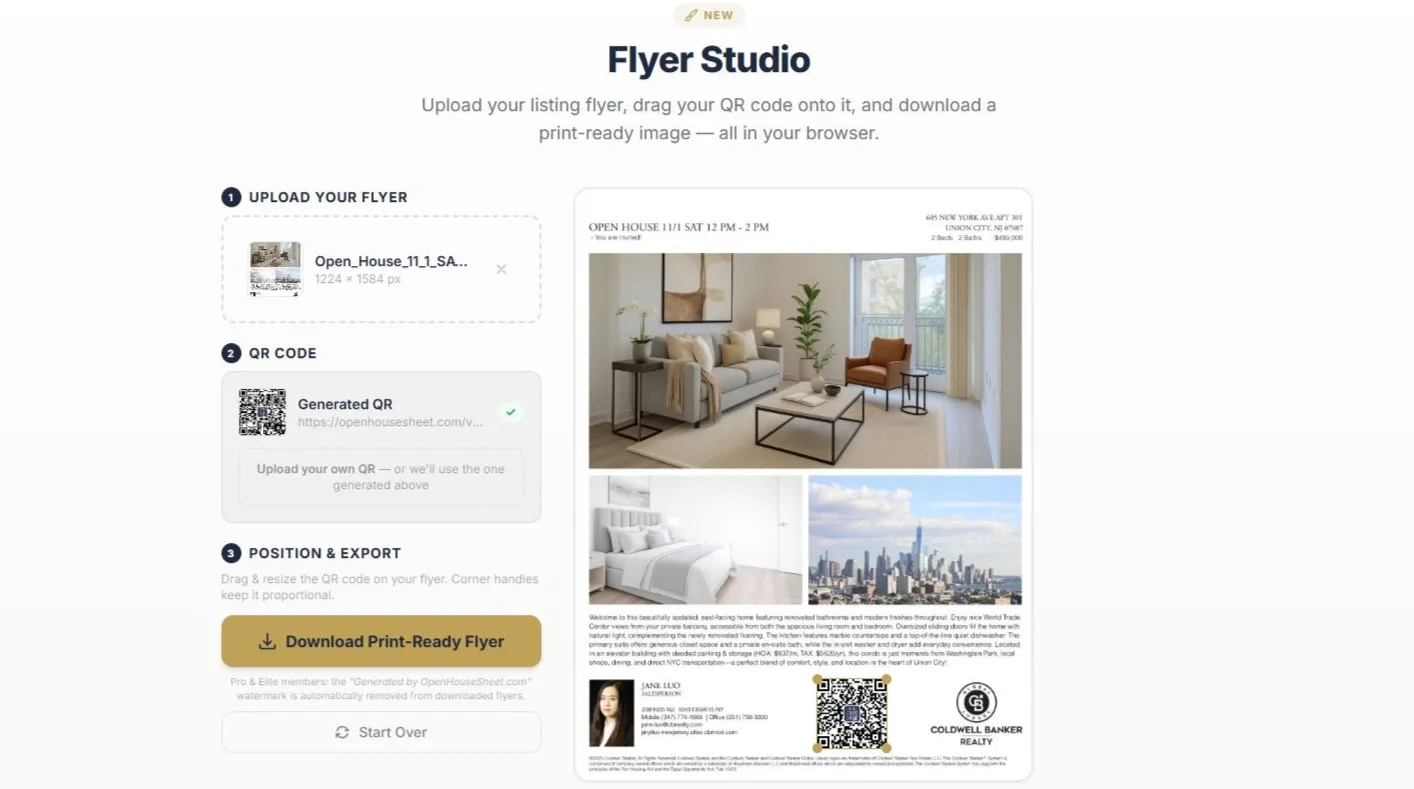
Flyer Studio lives on the QR Code Generator page, right below the QR code tool. It's a three-step workflow:
- Upload your flyer — or use the default. Drag and drop any listing flyer, social media post image, or marketing material (PNG, JPG, or WebP). If you don't upload anything, Flyer Studio loads a professional open house sign-in sheet template automatically.
- Place your QR code — a QR code is automatically placed on your image. Drag it anywhere on the canvas. Resize it by pulling the corner handles — the aspect ratio stays locked so the code always scans correctly.
- Download — click Download Print-Ready Flyer to get a high-resolution PNG at the original resolution of your uploaded image. For the default sign-in sheet, the export is rendered at 300 DPI — crisp enough for professional printing.
Everything happens in your browser.
💡 Pro Tip
Generate your QR code in the QR Code Generator first, then scroll down to Flyer Studio. The QR code you just generated is automatically loaded into the canvas — no need to upload it separately.
The Default Template: A Ready-to-Print Open House Sign-In Sheet
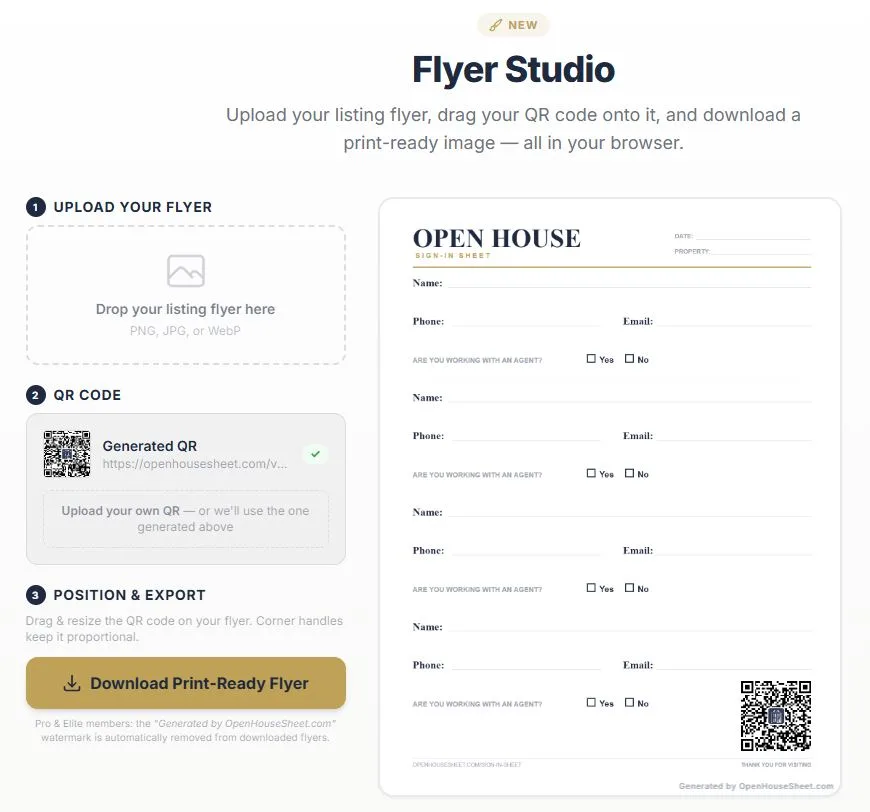
If you don't upload your own image, Flyer Studio loads a clean, professional open house sign-in sheet template. This is the same layout available on our Paper Sign-In Sheet page — an 8.5 × 11 inch sheet with:
- A bold "OPEN HOUSE" header with "SIGN-IN SHEET" subtitle
- Date and property address fields at the top
- Four visitor entry sections, each with Name, Phone, Email, and an "Are you working with an agent?" question with Yes/No checkboxes
- A clean footer with your site URL
A QR code linking to the AI Virtual Staging page is pre-placed on the template. Visitors scan the code at your open house and can immediately view staged photos of the property on their phone — bridging the gap between the physical space and its potential.
You can replace the default QR code with any URL. Generate a different QR code in the generator above — for your digital sign-in sheet, listing page, or any other link — and it automatically appears in Flyer Studio.
Upload Your Own Flyer, Social Media Image, or Marketing Material
The default template is useful, but the real power of Flyer Studio is uploading your own images. Any PNG, JPG, or WebP file works:
- Listing flyers — add a QR code to your existing brokerage flyer that links to the digital sign-in sheet or virtual tour.
- Social media graphics — place a QR code on your Instagram post or Facebook graphic so followers can scan it from a printed version at the open house.
- Door hangers and postcards — upload the design file and add the QR code before sending to print.
- Open house invitations — add a scannable code linking to directions, parking info, or the listing page.
The canvas preserves your image at its original resolution. A 3000 × 2000 pixel flyer downloads as a 3000 × 2000 pixel PNG — no quality loss.
Use Your Branded QR Code for Extra Impact
Flyer Studio works with any QR code — including branded QR codes with your logo. If you've uploaded your brokerage logo in the QR Code Generator above, the branded QR code (with your logo centered on it) is the one that gets placed on your flyer.
The result: a print-ready flyer where every element — from the listing photos to the QR code — reinforces your brand. Prospects recognize your materials before they even pick up the flyer.
Free vs. Pro: What's the Difference?
Flyer Studio is free for everyone. The only difference between free and paid is the watermark on downloaded files.
| Feature | Free | Pro / Elite |
|---|---|---|
| Use the canvas editor | ✅ Yes | ✅ Yes |
| Upload your own flyer | ✅ Yes | ✅ Yes |
| Drag & resize QR code | ✅ Yes | ✅ Yes |
| Default sign-in sheet template | ✅ Yes | ✅ Yes |
| Download print-ready PNG | ✅ With watermark | ✅ No watermark |
| Full original resolution | ✅ Yes | ✅ Yes |
| Cost | Free (sign-up required to download) | $29/mo Pro · $59/mo Elite or $19/mo · $39/mo billed annually |
Free users see a small "Generated by OpenHouseSheet.com" watermark on the downloaded image. Pro and Elite subscribers get clean, watermark-free exports automatically — no extra steps.
5 Ways Real Estate Agents Use Flyer Studio
- Open house sign-in sheet with QR code — use the default template with a QR code linking to your virtual staging gallery. Print it and place it at the front door. Visitors sign in on paper and scan the code to see the staged version of each room on their phone.
- Listing flyer with digital sign-in link — upload your brokerage's listing flyer and place a QR code linking to your digital sign-in sheet. Visitors scan and sign in digitally — no illegible handwriting, no manual data entry.
- Yard sign insert — create a simple flyer with a large QR code for the yard sign rider. Passersby scan from the sidewalk and get instant access to photos, pricing, and scheduling.
- Social media to print — upload your Instagram listing graphic and add a QR code. Print it as a flyer for the open house — same eye-catching design, now scannable.
- Property brochure upgrade — upload each page of your property brochure and add QR codes linking to the 3D tour, neighborhood info, or mortgage calculator.
How Flyer Studio Fits into Your Open House Workflow
Flyer Studio connects with the other tools on Open House App to create a seamless open house preparation workflow:
- Stage the property — use AI Virtual Staging to generate staged photos of vacant rooms.
- Generate a QR code — create a QR code linking to your virtual staging gallery or digital sign-in sheet. Add your logo for a branded QR code.
- Place it on your flyer — open Flyer Studio, upload your listing flyer (or use the default sign-in sheet), drag the QR code into position, and download.
- Print and display — bring the print-ready flyer to your open house. Visitors scan the QR code to access everything digitally.
Technical Details for Print Professionals
- Output format — PNG (lossless compression, preserves sharp QR code edges).
- Resolution — exports at the original resolution of your uploaded image. The default sign-in sheet template exports at 300 DPI (2550 × 3300 pixels for 8.5 × 11 inches).
- Supported input formats — PNG, JPG, WebP.
- QR code error correction — all QR codes use Level H (30% data recovery), ensuring reliable scanning even when printed small or on textured paper.
- Privacy — all rendering happens in your browser using HTML5 Canvas and JavaScript. No images are uploaded to any server. No data leaves your device.
Try Flyer Studio Now — It's Free
Upload your flyer, drag your QR code, download a print-ready image. No account needed to start.
Open Flyer StudioFrequently Asked Questions
What is Flyer Studio?
Flyer Studio is a free, browser-based tool from Open House App that lets real estate agents place QR codes on listing flyers, open house sign-in sheets, and other marketing materials — then download a print-ready PNG image. No design software required.
Is Flyer Studio free to use?
Yes. All users can use Flyer Studio for free, including uploading flyers and placing QR codes. Free downloads include a small "Generated by OpenHouseSheet.com" watermark. Pro and Elite subscribers get watermark-free downloads automatically.
What file formats does Flyer Studio support?
You can upload flyers and images in PNG, JPG, or WebP format. The download is always a high-resolution PNG file at the original resolution of your uploaded image, ready for professional printing.
Can I use Flyer Studio without uploading my own flyer?
Yes. Flyer Studio loads a default open house sign-in sheet template automatically. A QR code linking to the Virtual Staging page is pre-placed on it. You can download this default template as-is or replace the QR code with your own.
How do I remove the watermark from my downloaded flyer?
Upgrade to a Pro ($29/month or $19/month billed annually) or Elite ($59/month or $39/month billed annually) plan. The watermark is automatically removed from all your Flyer Studio downloads. Both plans include a 7-day free trial.
What is the default QR code on the sign-in sheet template?
The default QR code links to openhousesheet.com/virtual-staging — your AI Virtual Staging page. You can replace it by generating a different QR code in the QR Code Generator above Flyer Studio, or by uploading your own QR code image.