On a busy Sunday, five people arrive at once and one iPad becomes a line.
Quick answer
Yes, open house visitors can sign in by scanning a QR code with their own phone. In Open House App, the Pro sign-in shows a sign-in QR code on the welcome screen. Visitors scan it, answer the same questions as on your iPad, and land in the same visitor list, ready for CSV export and your thank-you email. With the gift option on, each visitor who signs in also gets an email with 3 free AI virtual staging tries. For flyers and signs, Pro and Elite include a Permanent Open House Link that opens whichever open house you are hosting. Pro is $29/month ($19/month billed annually) with a 7-day free trial, and free accounts can try the Pro sign-in on 2 open houses.
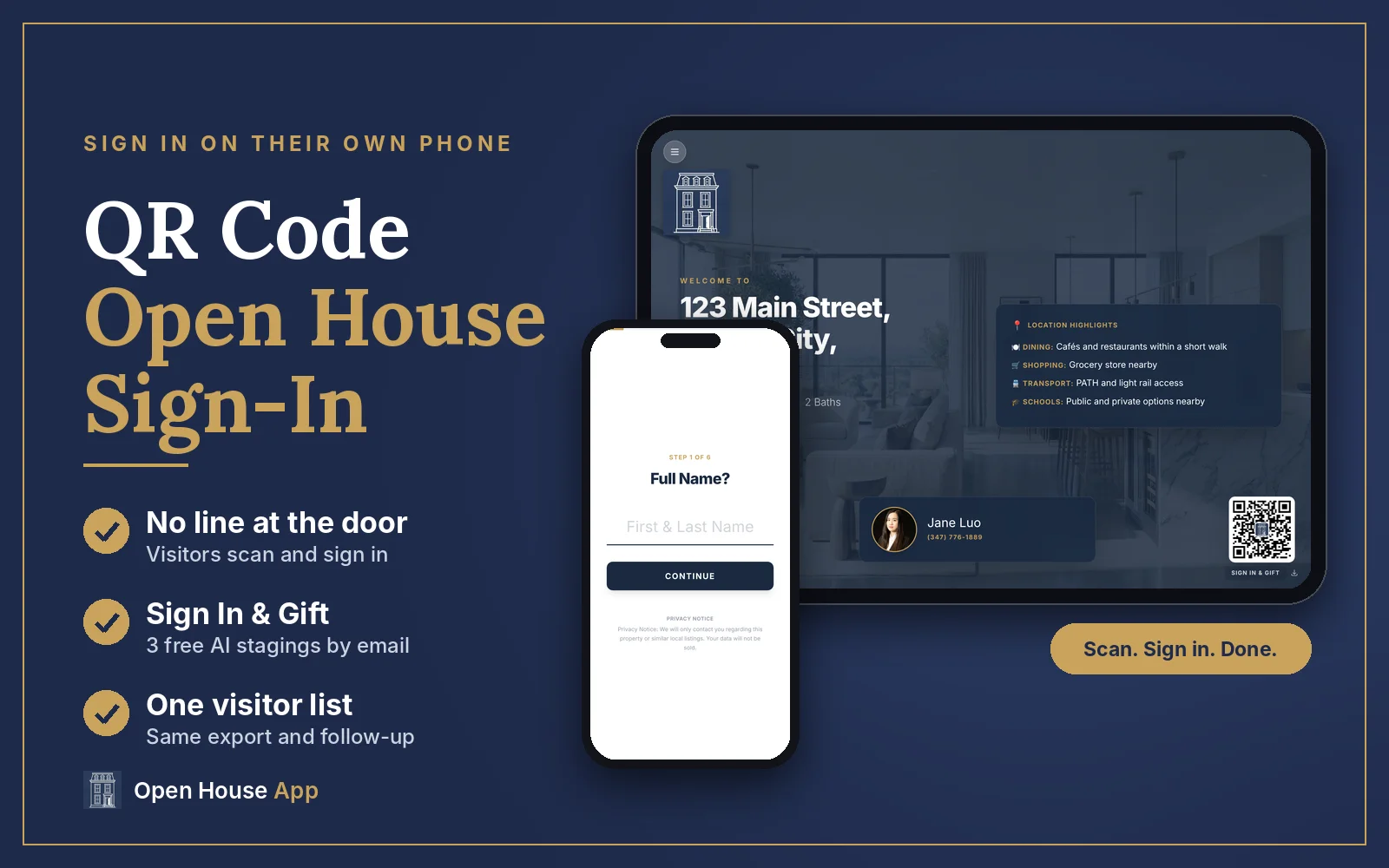
A tablet at the door works well until a group walks in together. Some visitors also prefer not to touch a shared screen, and others want to keep moving and fill in their details from the living room. A QR code solves all three: every visitor uses the phone already in their hand, and you keep the iPad free for the next person.
7-day free trial
Try QR sign-in at your next open house
Pro sign-in with a scan-to-sign-in QR code, AI Location Highlights and automatic thank-you emails.
How does QR code sign-in work at an open house?
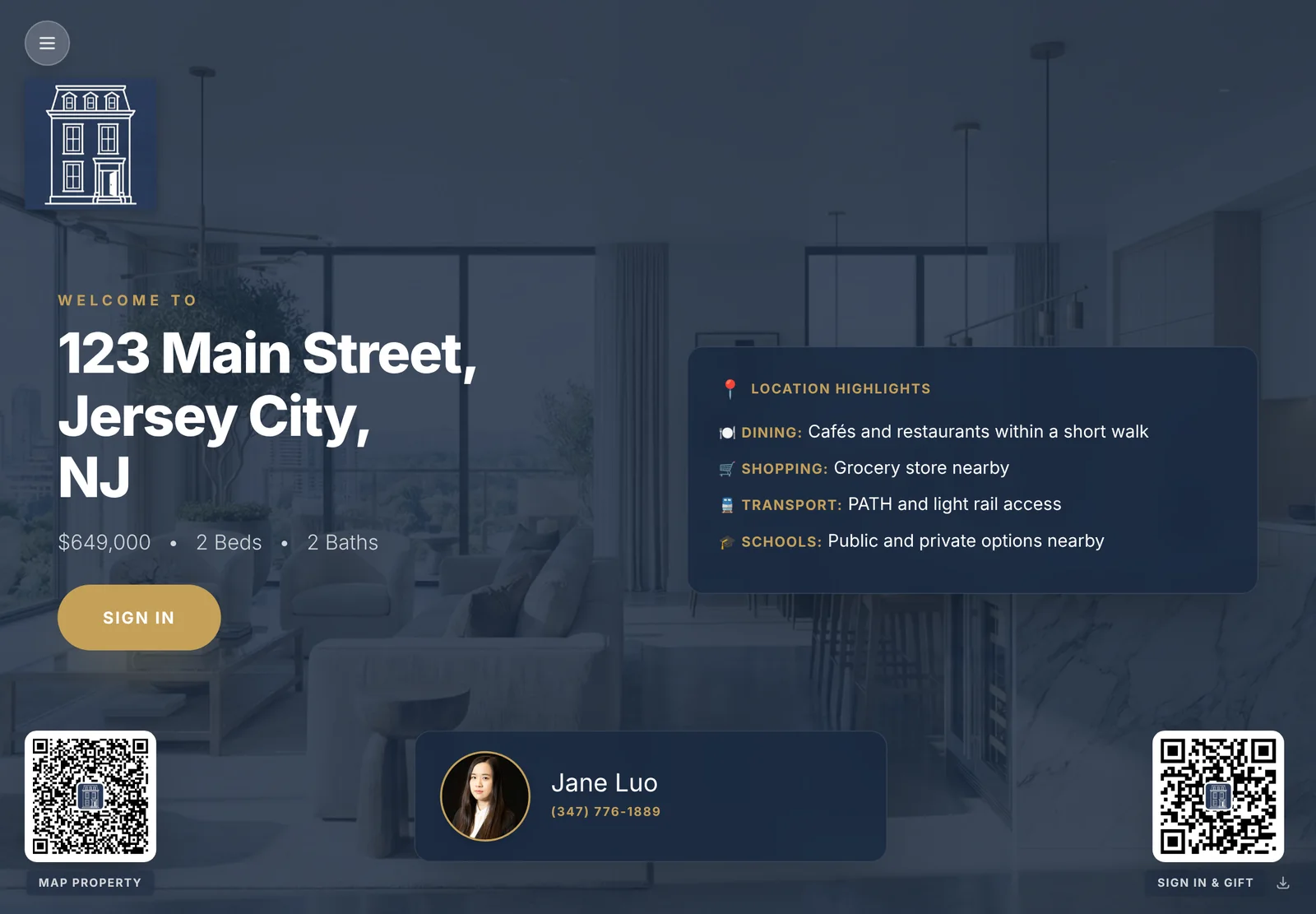
When you tap Start Open House in the Pro sign-in, your iPad shows a welcome screen with the listing, your AI Location Highlights, your agent card and two QR codes:
- Map Property (bottom left) opens the address in Google Maps.
- Sign In & Gift (bottom right) opens this open house's sign-in on the visitor's phone. If you turn the gift off, the label reads Scan to Sign In.
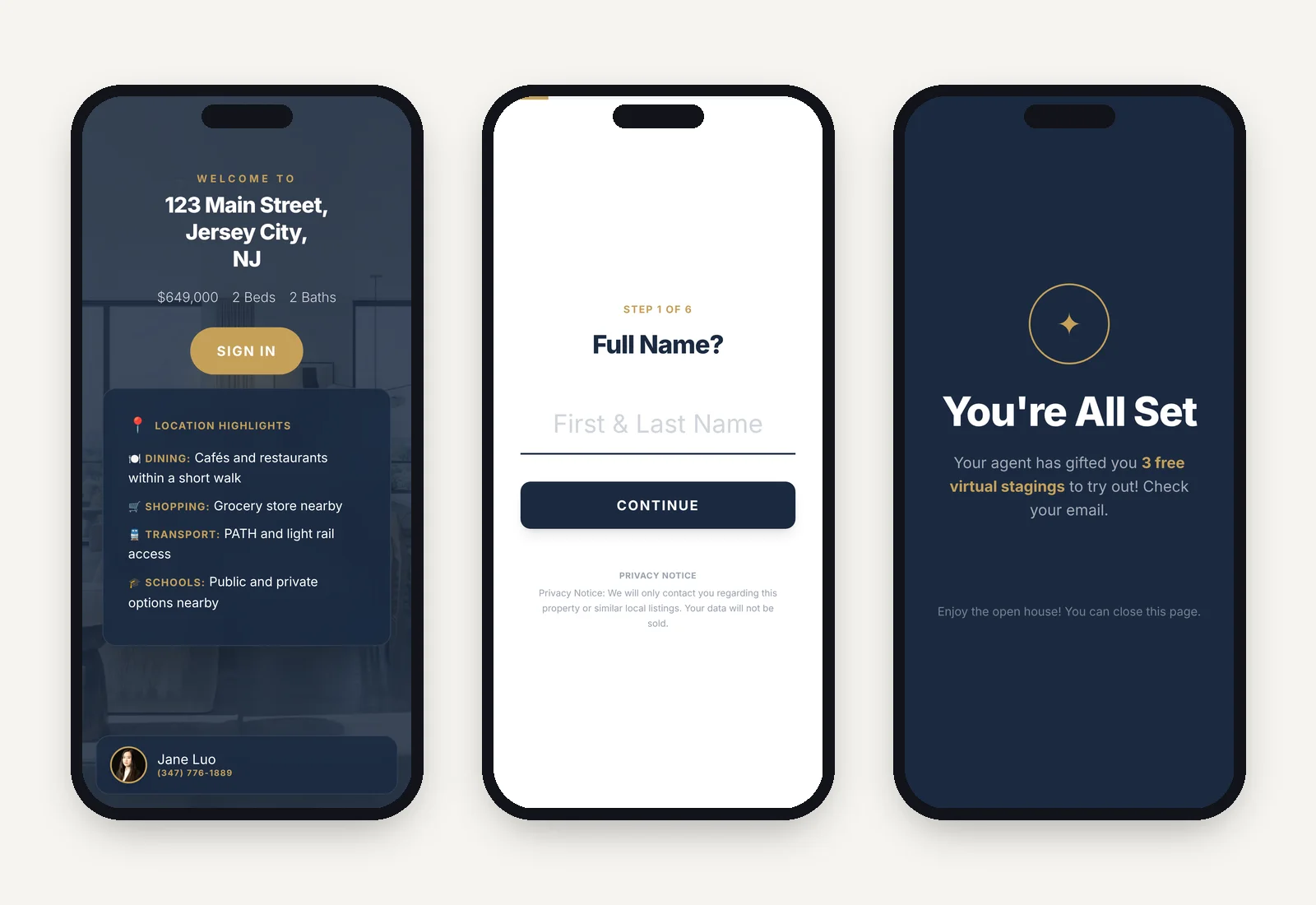
What does the visitor see on their phone?
- The listing welcome screen, with the address, price, Location Highlights and your name and phone number.
- The sign-in questions, one at a time: name, email, phone, how they found the open house, whether they are working with an agent, and how they want to be contacted, plus any custom questions you added and your privacy notice.
- A confirmation screen. With the gift on, it tells them their agent has gifted them 3 free virtual stagings and to check their email.
Each sign-in goes into the same visitor list as the iPad sign-ins. You export them the same way (CSV or Export to CRM), and on Pro the automatic thank-you email goes to QR visitors too when you tap End Open House.
How do you turn it on?
There is nothing extra to set up. The sign-in QR appears on the welcome screen as soon as you start an open house in the Pro sign-in. Before you tap Start Open House, check two settings at the bottom of the setup screen:
- Email buyers a virtual staging gift link. On by default. In the app's words: "Buyer gets 3 free tries, you get 1 bonus credit."
- Auto-send a thank-you email when the open house ends (Pro and Elite). One email for visitors who have an agent, another for everyone else.
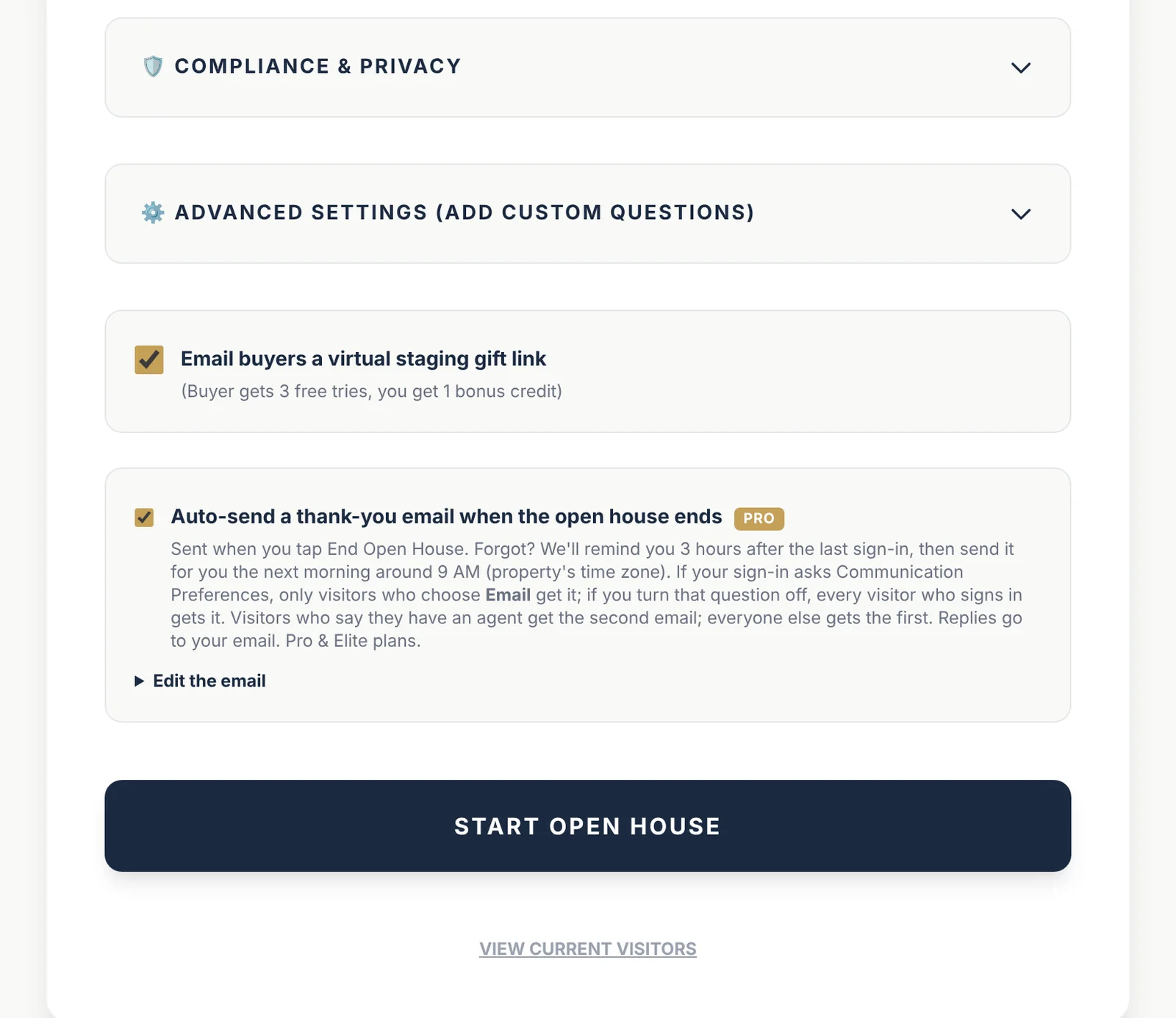
Want custom questions, such as buying timeline or mortgage pre-approval? Add them under Advanced Settings. QR visitors get the same questions.
Where should you put the sign-in QR code?
- On the iPad welcome screen. It is already there. Prop the iPad up where people enter.
- On flyers, table cards and sign riders you print ahead of time. Use the QR code for your Permanent Open House Link (next section). It works at every open house, so you print it once.
- On a one-off card for today. The download icon next to the code on the welcome screen saves a high-resolution PNG of today's sign-in QR.
One rule: the QR code on the welcome screen belongs to that open house. After you tap End Open House, scanning it shows your contact card instead of the form. That is why printed materials should use your permanent link instead.
What QR code should you print on flyers and yard signs?
Print the QR code for your Permanent Open House Link, openhousesheet.com/a/your-username. It is included with Pro and Elite, and it never changes:
- While you are hosting an open house, scanning it opens that open house's sign-in on the visitor's phone. It looks for an open house you started in the last 12 hours; if you have more than one running, it opens the one you started most recently.
- At any other time, it shows your contact card: your photo, phone, company and license number, a Save Contact button, and up to 3 of your recent listings.
How to get it: in your account, go to Settings and claim a username. Then open the free QR Code Generator and tap 🔗 Open House Link under Quick Generate: it fills in your link, so you can add your logo and download a PNG. (The QR Code button next to your link on your account dashboard and under My Listings does the same.) The code you generate also appears in Flyer Studio, ready to drag onto your flyer.
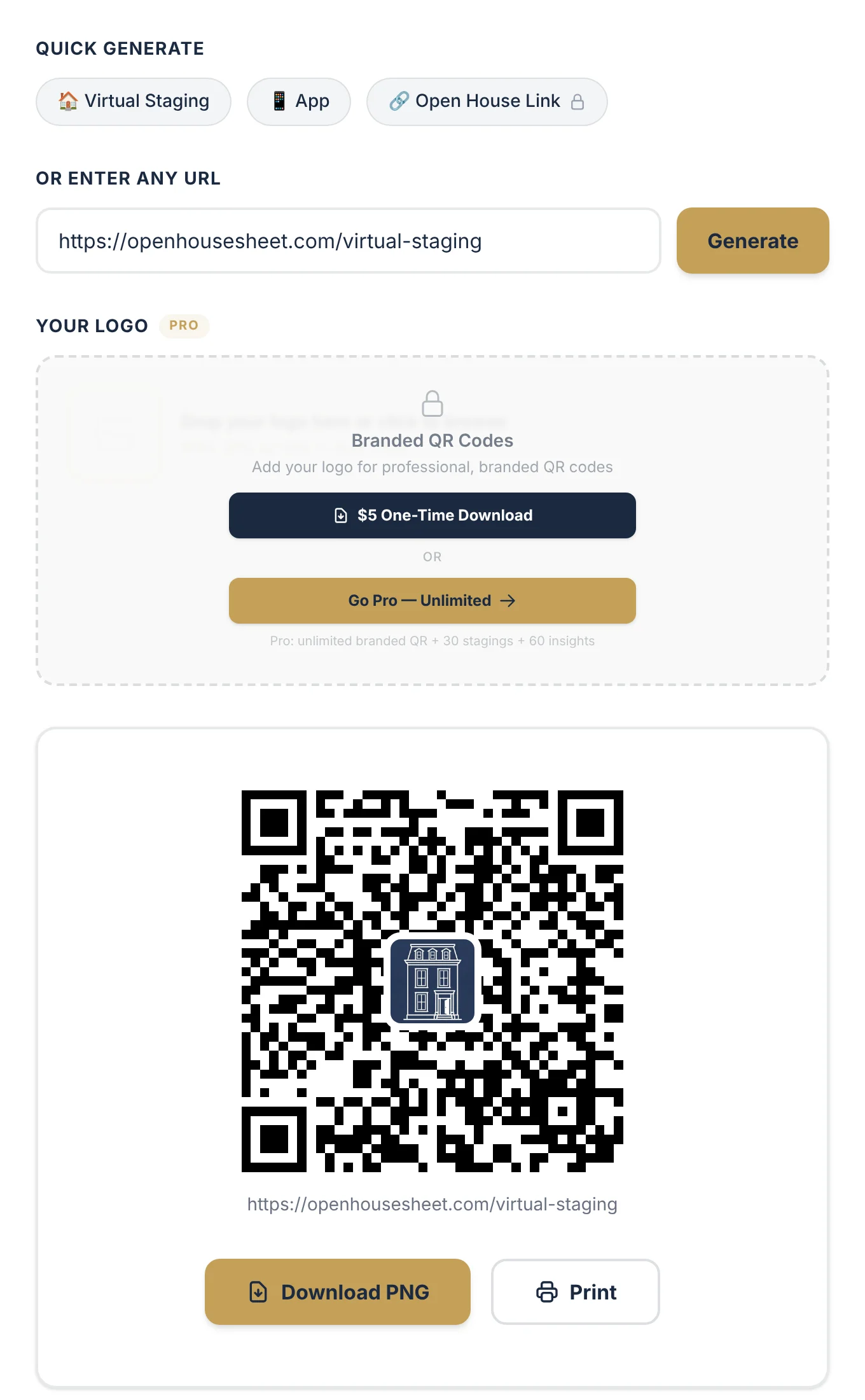
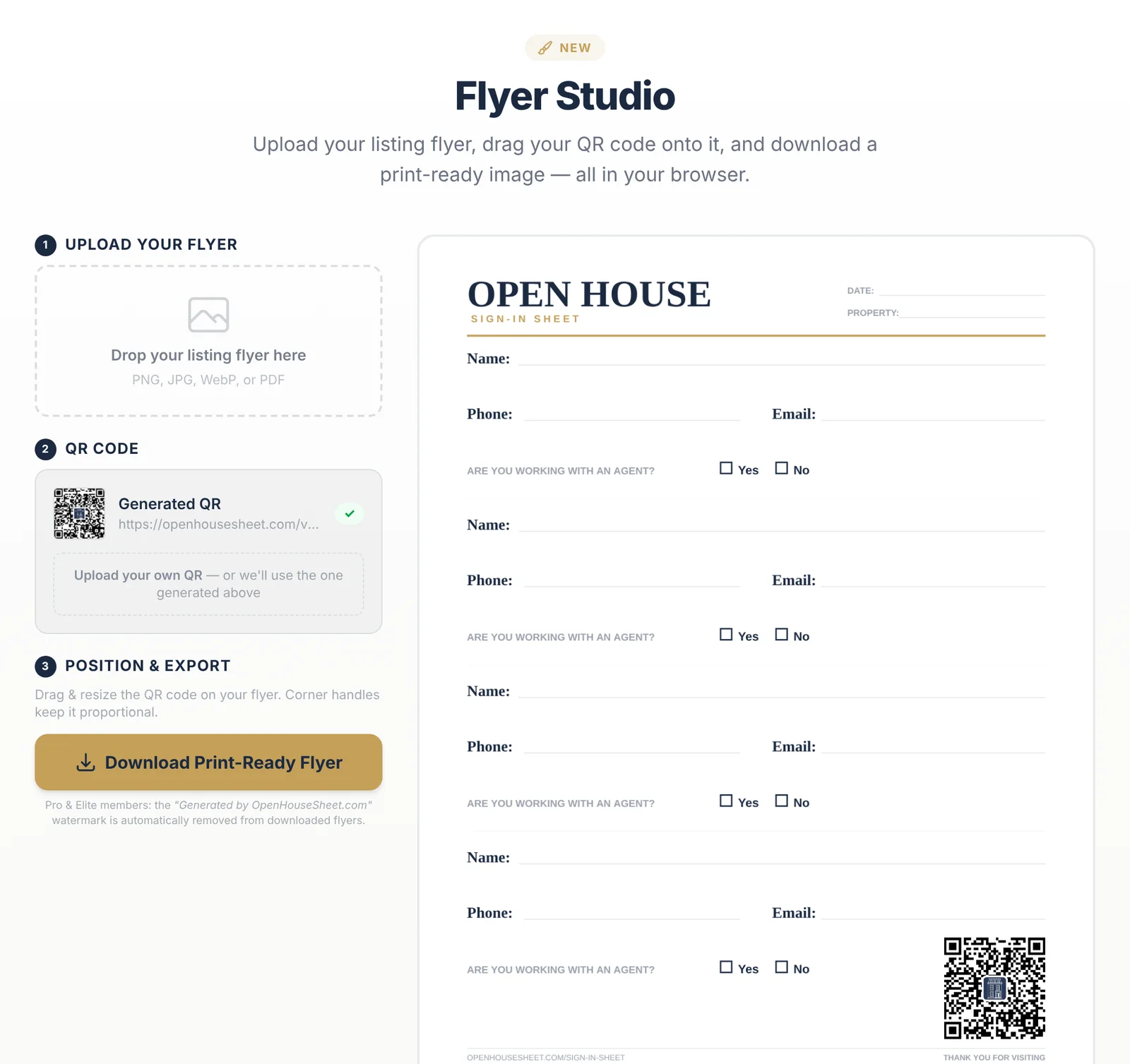
Two habits keep it working: tap End Open House when you finish, so the link switches back to your contact card, and host one open house at a time. On the free plan, link printed QR codes to your virtual staging page instead. For QR design tips, see Branded QR Codes for Open House Flyers.
Should QR sign-in replace the iPad?
No. Use both. QR sign-in shortens the line, but it depends on two things you do not control: the visitor's willingness to scan, and their phone's signal. In basements, concrete high-rises and other dead zones, the form cannot load on a visitor's phone, while your iPad keeps working (see Offline Open House Sign-In). Greet people at the door, offer the iPad first, and point to the QR code when a group arrives.
Which plan includes QR sign-in?
| Plan | QR codes on the welcome screen | Price |
|---|---|---|
| Basic web sign-in | Map Property only | Free |
| Pro sign-in, free account | Map Property + Sign In & Gift, on 2 open houses (shared with your 2 free AI Location Insights) | Free |
| Pro | Map Property + Sign In & Gift, unlimited open houses, plus your Permanent Open House Link | $29/month or $19/month billed annually; 7-day free trial |
| Elite | Same as Pro, with higher AI limits and priority support | $79/month or $59/month billed annually; 7-day free trial |
QR sign-in checklist
- ☐Set up the Pro sign-in: listing photo, logo, headshot and Location Highlights.
- ☐Keep "Are you working with an agent?" on, and add any custom questions.
- ☐Decide on the staging gift and the automatic thank-you email.
- ☐Print your Permanent Open House Link QR code on your flyer and a table card, then tap Start Open House.
- ☐Scan the printed code once with your own phone to check it opens today's sign-in.
- ☐Tap End Open House when you finish, so the thank-you emails go out and your link switches back to your contact card.
For everything else on the day, use our open house checklist and the 7 follow-up email templates.
All in one place
Every visitor signed in, on any device
iPad, phone or QR code, all in one visitor list. Free account, no credit card.
Keep reading

About the author
Jane Luo is the founder of Open House App. She is a licensed NJ & NY realtor at Coldwell Banker Realty (NJ Circle of Excellence Award recipient), a senior data scientist, and a Google Cloud Certified Generative AI Leader. She builds the tools she uses at her own open houses.
Frequently Asked Questions
Can open house visitors sign in with a QR code?
Yes. In Open House App's Pro sign-in, the welcome screen shows a sign-in QR code. Visitors scan it, answer the same questions as on your iPad, and appear in the same visitor list.
Is QR code sign-in free?
QR sign-in is part of the Pro sign-in. Free accounts can try it on 2 open houses; Pro is $29/month or $19/month billed annually, with a 7-day free trial. The free Basic web sign-in shows a Map Property QR code only.
Does the open house QR code expire?
The QR code on the welcome screen belongs to one open house. After you tap End Open House, scanning it shows your contact card instead of the sign-in form. For printed materials, use your Permanent Open House Link, which does not expire.
What QR code should I print on open house flyers?
Print the QR code for your Permanent Open House Link (openhousesheet.com/a/your-username, Pro and Elite). While you are hosting an open house, it opens that open house's sign-in; at other times it shows your contact card. Claim a username in Settings, then tap Open House Link under Quick Generate in the free QR Code Generator.
What is the Permanent Open House Link?
A link that never changes, openhousesheet.com/a/your-username. If you started an open house in the last 12 hours and have not ended it, scanning opens that open house's sign-in (the most recently started one if several are running). Otherwise it shows your contact card with a Save Contact button and up to 3 recent listings.
What is the Sign In & Gift QR code?
When the gift option is on, the sign-in QR is labeled Sign In & Gift. Each visitor who signs in gets an email with a gift link for 3 free AI virtual staging tries, and you get 1 bonus credit.
Does QR sign-in work without cell service?
No. The visitor's phone needs a connection to open the form. In a dead zone, keep an iPad at the door; the free iOS app works fully offline.