Someone walks in, picks up the pen and looks for where to write. If the sheet is clear, that takes ten seconds. If it isn't, you end up with half a name, no phone number and a headcount nobody trusts. I learned this at my own open house: ten visitors signed my paper sheet, five entries were readable and only two phone numbers worked.
Quick answer
A good sign-in sheet has a clear title, a date line, numbered rows and only the columns you'll use, usually Name, Phone and Email. Print one row per expected guest plus a spare page. Open House App's free sign-in sheet template has 20 numbered rows on US Letter paper and prints or downloads as a PDF with no signup.
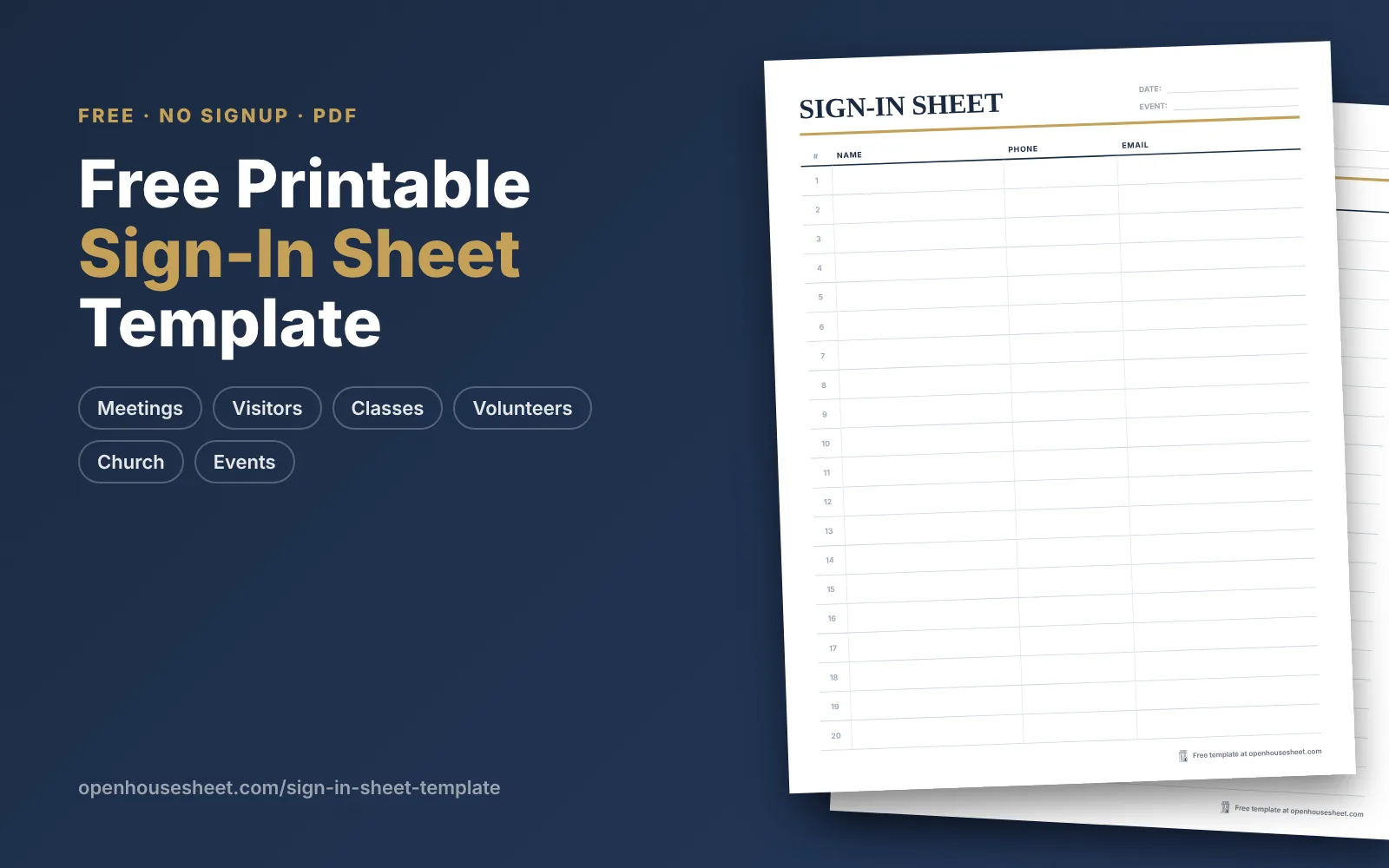
Free · No signup · US Letter PDF
Print a free 20-row sign-in sheet
Numbered rows for name, phone and email, with date and event lines at the top.
What is a sign-in sheet?
A sign-in sheet is a page where people write their name, and often their contact details, when they arrive. It gives you a record of who came and a way to reach them afterward. Offices keep one at the front desk, and people use them for meetings, classes, volunteer shifts, church events, parties and open houses.
A sign-up sheet is different. People add their name ahead of time to claim a slot, a shift or a dish to bring. If people write their name when they walk in, you want a sign-in sheet.
What should a sign-in sheet include?
- A title that says what it is, like "Staff Meeting Sign-In". Months later, in a folder, the page still makes sense.
- Date and event lines at the top, filled in once instead of on every row.
- Numbered rows. The last number used is your headcount, with no counting.
- A wide Name column. Names are the longest thing people write.
- Only the columns you'll use: phone and email if you'll follow up, a signature if you need proof of attendance, time in and out for visitors or volunteers.
- Room to write. Three or four columns is the sweet spot on US Letter paper. Each extra column makes every box narrower and the handwriting messier.
Leave out anything you don't need. Every extra column slows the line down and collects information you then have to keep safe.
Sign-in sheet templates by type
Same idea, different columns. Pick the row that matches your event:
| Type of sheet | Title on the sheet | Columns | Tip |
|---|---|---|---|
| Meeting | Meeting Sign-In | Name, Department, Email, Signature | Write the topic on the Event line |
| Visitor / front desk | Visitor Log | Name, Company, Visiting, Time In, Time Out | Keep it where staff can see it |
| Event, party or guest list | Welcome! Please Sign In | Name, Phone, Email | 20 rows a page keeps the line moving |
| Class, training or workshop | Training Attendance | Name, Email, Signature | Signatures show who attended |
| Volunteer | Volunteer Sign-In | Name, Phone, Time In, Time Out, Total Hours | Total hours makes reports easy |
| Church or community event | Guest Sign-In | Name, Phone, Email, First Visit? | Lets you welcome first-time guests |
| Employee / daily | Daily Sign-In | Name, Time In, Time Out, Signature | Use one sheet per day |
| Real estate open house | Open House Sign-In | Name, Phone, Email, Working with an agent? | Use the open house sheet |
The free template prints Name, Phone and Email, which covers parties, church events, guest lists and most meetings. For the other column sets, open the editable sign-in sheet template. Your own columns are part of a one-time $5 unlock.
Meeting sign-in sheet
For staff meetings, board meetings, HOA meetings and trainings, the point is a record of who attended. Name, department and email let you send the notes afterward. Add a signature column only if attendance has to be confirmed, for example for continuing education hours.
Visitor sign-in sheet (sign in and sign out)
A front desk visitor log needs to show who is in the building right now, so it adds Time In and Time Out. Add Company and "Visiting" (the person they're there to see). Keep the clipboard where staff can see it, not by the door.
Event, party and guest sign-in sheet
For a birthday, baby shower, reunion, open studio or networking night, keep it short: name, phone and email. Twenty rows a page with a clear "Please sign in" title gets people through the door quickly. It also works as a simple guest book.
Class, training and workshop sign-in sheet
Teachers, coaches and trainers use the sheet as an attendance record. A signature column shows each person was there, and email lets you send slides or certificates. For a class that meets every week, print a fresh sheet for each session and write the date at the top.
Volunteer sign-in sheet
Volunteer coordinators usually need hours, not just names. Time In, Time Out and Total Hours turn the sheet into the record you'll need for reports and service-hour letters.
Church sign-in sheet
For guest Sundays, small groups and community dinners, name, phone and email let you follow up. A "First visit?" column helps you welcome newcomers personally.
Employee sign-in sheet
A daily employee sign-in sheet records arrival and departure times. Use one sheet per day and keep it with your timekeeping records.
Open house sign-in sheet
Real estate agents also need to know whether each visitor already has an agent. The free open house sign-in sheet asks that, and the editable open house sheet adds your headshot and contact info.
How many sign-in sheets should you print?
Divide the number of guests you expect by the rows per page, round up, then add one spare page for walk-ins.
Example: 125 guests
125 ÷ 20 rows = 6.25, so 7 pages, plus 1 spare = 8 pages. On the free template every page is numbered 1 to 20, so your total is 20 for each full page plus the last number on the last page.
For bigger events, the editable template can number the rows straight through: 1 to 125 across 7 pages, with "Page 1 of 7" on each and only 5 rows on the last page. The last number written is your headcount. If more than 50 people arrive at once, set out two clipboards so the line doesn't stall.
Printable PDF or a Word, Google Docs or Excel template?
You can build a sign-in sheet in almost anything. The difference is how much fixing it takes before it prints right.
| Option | Best for | Watch out for |
|---|---|---|
| Free PDF template | Printing in under a minute, on any printer | Columns are fixed: Name, Phone, Email |
| Editable template | Your title, rows per page, logo and columns | Logo, columns and numbered pages are $5 one-time |
| Word or Google Docs | One-off layouts you design yourself | Tables and margins can shift when you print |
| Excel or Google Sheets | Typing the list into a spreadsheet afterward | Gridlines and page breaks need setting up |
| Digital sign-in | No handwriting to read and no retyping | Needs a tablet or phones |
How to print a sign-in sheet that looks right
- Open the sign-in sheet template and choose Print or Download PDF.
- Pick US Letter, portrait. On A4 paper, choose "Fit to page".
- Set the scale to 100% or "Actual size" so the rows print at full height.
- Print one test page before running copies.
- Fill in the date and event before the doors open.
- Use a clipboard and two pens. One pen always walks off.
Keep sign-in sheets private
On an open clipboard, everyone who signs can read the phone numbers and emails above their line. A few habits help:
- Ask only for what you'll use, and say why ("so we can send you the slides").
- Keep the sheet where someone is watching, not by an empty doorway.
- Once you've typed up the list, file the paper somewhere locked or shred it.
- Don't ask for sensitive details, like the reason for an appointment, on a sheet everyone can see.
Want your logo or your own columns?
The editable sign-in sheet template lets you change the title and choose 5 to 20 rows per page for free with an account. A one-time $5 adds your logo, up to 5 columns of your own, up to 3 lines at the top and numbered pages for up to 500 guests. Here's how, step by step: How to Make a Custom Sign-In Sheet With Your Logo.
Key takeaways
- Title, date line, numbered rows and 3–4 columns: that's a sign-in sheet people can fill in fast.
- Name, Phone and Email cover most events. Add Time In and Out for visitors and volunteers, and a signature for training.
- Print guests ÷ rows per page, rounded up, plus one spare page. 125 guests at 20 rows a page is 8 pages.
- A ready PDF prints the same on any printer. An editable template handles your logo and columns.
Free · No signup · No email
Print your free sign-in sheet
20 numbered rows for name, phone and email, with date and event lines. US Letter PDF, ready in one click.
Get the Free Template →Need your logo or your own columns? Customize it.
Keep reading

About the author
Jane Luo is the founder of Open House App. She is a licensed NJ & NY realtor at Coldwell Banker Realty (NJ Circle of Excellence Award recipient), a senior data scientist, and a Google Cloud Certified Generative AI Leader. She built Open House App after ten visitors signed her paper sheet at one open house and only two phone numbers worked. More about Jane →
Frequently Asked Questions
Where can I get a free printable sign-in sheet?
Open House App's sign-in sheet template is free with no signup or email. It has 20 numbered rows for name, phone and email, date and event lines at the top, and prints or downloads as a US Letter PDF.
What is the difference between a sign-in sheet and a sign-up sheet?
People fill in a sign-in sheet when they arrive, as a record of who came. They fill in a sign-up sheet ahead of time to claim a slot, a shift or an item to bring.
What columns should a meeting sign-in sheet have?
Name, Department (or Company), Email and Signature. Write the meeting topic and date at the top. Add the signature column only if you need proof of attendance.
What should a visitor sign-in sheet include?
The date at the top, then Name, Company, Visiting (the person they're there to see), Time In and Time Out. Time Out shows who is still in the building.
How many sign-in sheets do I need for 125 people?
At 20 rows per page, 7 pages fit 125 people. Print 8 to leave a spare for walk-ins. The editable template can number the rows 1 to 125 across the pages, so the last number written is your headcount.
Is a sign-in sheet the same as an attendance sheet?
Almost. On an attendance sheet, names are listed ahead of time and you check people off. On a sign-in sheet, the rows are blank and people write their own names. Both record who was there.
Can I make a sign-in sheet in Google Docs or Word?
Yes. Insert a table with one column per item you need and about 20 rows, then add a title and date line. Tables can shift when printed, so check a test page. Or start from the free Word and Google Docs sign-in sheet template.
What columns should a volunteer sign-in sheet have?
Name, Phone, Time In, Time Out and Total Hours. Total Hours makes service-hour reports and letters quick to fill in.